
Okada Voice Changer
Okada Voice Changer is a free, open-source, real-time AI voice modulator that’s taken gamers, streamers, VTubers, and privacy-minded users by storm. This guide distils hands-on experience and the latest 2025 insights into one people-first resource: you’ll discover what makes Okada special, exactly how to install and configure it on Windows or macOS, and the tweaks that turn great-sounding models into near-instant, natural conversations. Whether you want an anonymous voice in Discord, an anime persona in VRChat, or studio-quality dubbing without hiring actors, everything you need is here.
Download Okada Voice Changer Here
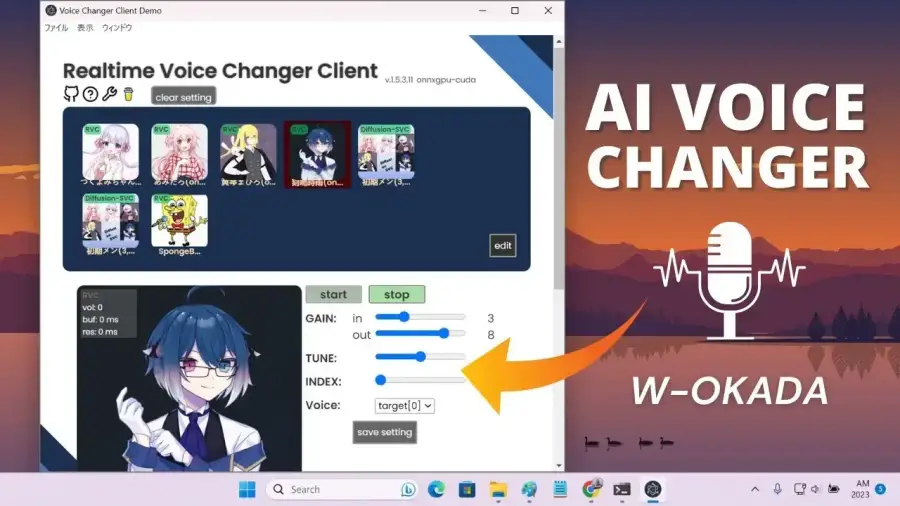
Why Okada Voice Changer Stands Out in 2025
Okada isn’t a simple pitch shifter; it runs cutting-edge AI voice-conversion models (RVC, so-vits-svc, MMVC, DDSP-SVC, the Beatrice merger, and more) entirely on your hardware. The result is expressive, emotion-preserving voices that put older “chipmunk” or “robot” effects to shame.
• Runs 100 % locally—no cloud, no data leaks.
• Unlimited use and model swapping—all free.
• GPU acceleration on NVIDIA, AMD, Intel, and Apple-silicon Macs.
• Optional client–server mode to offload heavy processing to a second PC.
Quick Glance: Pros, Cons & System Requirements
| PROS (What you gain) | CONS (What to plan for) | |
|---|---|---|
| Cost | Completely free & open-source | None—but you “pay” in setup time |
| Voice quality | Lifelike, emotional, gender swap, celebrity models | Needs good mic & models |
| Flexibility | Custom/merged voices, pitch & formant sliders | Default English models are few |
| Privacy | Offline processing, no account | Download models only from trusted sources |
| Performance | GPU-accelerated, ultra-low latency possible | Heavy VRAM/CPU use on weak PCs |
| Stability | Frequent community updates | Occasional beta bugs |
Recommended specs: Quad-core CPU, 16 GB RAM, mid-range GPU (RTX 3060 8 GB VRAM or Apple M1). Lower hardware can run, but latency rises sharply.
Streamlined Installation (Windows & macOS Only)
All current builds live on Hugging Face
Inside the file list you’ll see several large ZIP files—choose the one that matches your OS and grab the most recent version number.
Pick the Correct Download
• Windows (CUDA build, ~3.7 GB): Look for files namedvcclient_win_cuda_[version].zip
(size ≈ 3.70 GB; later versions have higher numbers).
• macOS (ONNX build, ~500 MB): Choosevcclient_mac_[version].zip
(around 500 MB).
Ignore other archives unless you have a special reason; the two above cover almost every user.
Windows Installation in 3 Steps
- Extract the ZIP anywhere you like—e.g.,
C:\Okada\. - Open the extracted folder and right-click > Run as administrator on
MMVCServerSIO_win_cuda.exe(or similarly named “MMVCServerSIO … cuda”).
A command window appears; it will prepare the local server automatically. - When the browser window pops up (usually at
http://localhost:18888/), you’re ready to select a mic, pick a voice model, and start changing voices.
macOS Installation in 3 Steps
- Unzip the
vcclient_mac_[version].ziparchive—this creates a folder. - Inside, double-click
MMVCServerSIO_mac_onnxcpu.app(first run may prompt “unidentified developer”; allow it in System Settings → Privacy & Security). - Safari/Chrome launches the Okada GUI; grant microphone access when macOS asks.
First-Run Checklist
• Wear headphones to avoid feedback loops.
• If you need to pipe audio into Discord/OBS, install a virtual cable (VB-Cable on Windows, BlackHole on macOS) and set Okada’s Output Device to that cable.
• Click Start in the GUI, speak, and hear your new voice instantly.
[VISUAL SUGGESTION: Insert an image here that shows the Hugging Face file list with the two highlighted ZIPs ➜ one at ~3.7 GB (Windows) and one at ~500 MB (macOS). Alt text: "Selecting the correct vcclient download on Hugging Face".]
Adding Voice Models in Seconds
Need an English female, a cartoon robot, or a celebrity voice? The community maintains a giant Voice Models post with direct download links. Grab a model (.pth or .onnx) and drop it in the models folder, then click Add in the Okada GUI and select it. Switch voices live with zero downtime.
Tuning Okada for Real-Time Performance
Chunk & Extra
Chunk 256–512, Extra 8192–16384 keeps latency under 200 ms on RTX 30-series cards.
F0 Engine
RMVPE = fastest + most natural; Harvest is solid cross-platform fallback.
Fine-Tune Pitch & Formant
Subtle ±1-2 semitones and slight formant shifts polish gender presentation.
[VISUAL SUGGESTION: Insert an image here of the Okada settings page with Chunk, Extra, and F0 dropdown circled. Alt text: "Latency controls in Okada Voice Changer".]
Okada vs Voicemod vs Voice.ai
| Feature/Metric | Okada (Free) | Voicemod (Paid/Freemium) | Voice.ai (Freemium) |
|---|---|---|---|
| Price & limits | $0, unlimited use | Subscription for full set | Credits or GPU mining |
| Voice realism | ⭐⭐⭐⭐☆ (model-dependent) | ⭐⭐☆☆☆ (DSP + few AI) | ⭐⭐⭐☆ (cloud AI) |
| Custom models | Yes, any .pth/ONNX | Very limited | Marketplace voices |
| Offline privacy | 100 % local | Needs online login | Requires internet |
| Ease of setup | Tech-savvy | Plug-and-play | Easy installer |
| Hardware load | High GPU/CPU | Light | Medium |
Safety, Privacy & Responsible Use
Okada never transmits your mic audio off-device; the only internet traffic is downloading the ZIP and optional voice models. Always credit or obtain permission if you plan to monetize content using a recognisable celebrity voice.
Troubleshooting Cheat-Sheet
| Symptom | Quick Fix |
|---|---|
| Delay >1 s | Lower Chunk, enable GPU, close background apps |
| Robotic output | Switch F0 engine, raise Extra, check mic gain |
| Echo grows squeaky | Use headphones, disable “listen to this device” |
| GUI won’t start | Run as admin (Win) / allow in Security (Mac) |
Conclusion & Next Steps
Invest an hour to install Okada and you’ll wield a studio-grade, real-time voice lab—free, private, and endlessly hackable. Download a few community models, save your favourite presets, and let your imagination take the mic.
FREQUENTLY ASKED QUESTIONS (FAQ)
QUESTION: Is Okada Voice Changer really free forever?
ANSWER: Yes—both the program and all core features are open-source with no subscriptions or usage caps.
QUESTION: Which ZIP do I download if I’m on Windows 11?
ANSWER: Always grab the latest vcclient_win_cuda_[version].zip (~3.7 GB) from the Hugging Face page. Newer version number = newer build.
QUESTION: Do I still need VB-Cable on Windows if I only want to hear myself?
ANSWER: No. VB-Cable is only required when you want other apps (Discord, OBS, Zoom) to hear the changed voice. For self-monitoring, set Okada’s output to your headphones directly.
QUESTION: Can I run Okada on older Intel Macs?
ANSWER: It will start, but performance is limited—expect noticeable latency without Apple-silicon acceleration. For best real-time results, use an M1/M2 Mac.
QUESTION: Where can I get more voices?
ANSWER: Check the community Voice Models post linked on the Okada GitHub/Hugging Face page—hundreds of user-trained voices are ready to drop into your models folder.